

Many remote collaborators start their first day without their laptop. They have access to Slack, Notion, everything they need. But not the tool they need to work.
This happens more often than companies admit. It is not a problem of occasional poor planning. It is the consequence of treating IT onboarding and welcoming as two separate processes, with different departments, different suppliers, and schedules that almost never align.
When onboarding works well, it is invisible. When it fails, it is immediately noticeable in productivity and the company's first impression.
In remote teams across several LATAM countries, this becomes even more complicated. Each country has its own customs logic, its own suppliers, and its own delivery times.
What in a centralized office is an internal procedure, here is a logistics operation.
IT onboarding: The preparation, setup, and delivery of everything a collaborator needs to start working from day one: laptop, accessories, access, and security. |
The importance of a structured remote onboarding
When a company hires someone new, the pressure to fill the vacancy and the urgency for immediate productivity often underestimate the importance of the first impression.
Companies that retain talent know that the initial experience sets the tone for the entire employment relationship. A good onboarding is not a formality. It is the first message about the culture and the value placed on the new hire.
A defined process prevents new talent from wasting days sorting out access or basic questions. The clearer it is, the faster they can add value.
It also organizes internal operations. IT, HR, and managers work in coordination. Improvisation and security risks are reduced: incorrect access, information loss.
Remote onboarding: Integration process for new employees who work remotely. It provides them with the tools, access, and context they need to be productive from day one. |
Impact on Retention and Culture
The first few days influence the emotional decision to stay. A chaotic experience breeds doubt. An organized one conveys professionalism.
A good onboarding process communicates how the company works, what its values are, and what the environment is like. If there is clarity and follow-up, the person feels welcome and builds a sense of belonging.
In teams distributed across several countries, onboarding plays a critical role: it ensures that the person has everything they need from day one, remotely.
Why it fails: HR, IT, and OPS working in silos
Tech onboarding seems like an IT issue. In practice, it involves three areas:
HR plans the start dates and communicates when each person begins
IT prepares devices, configures access, and applies security
OPS coordinates logistics: ensuring the equipment arrives at the right place, at the right time
When these three areas work in silos, each with its own calendar and no visibility into the others, the process becomes fragmented.
In smaller companies, the problem takes another form. There is a single person handling HR, IT, and OPS at the same time. When someone new starts, that person is already managing hiring, culture, tools, and a thousand other things. Tech onboarding ends up being just another task on a list that never gets shorter.
The cost is not abstract. An employee without a laptop on day one can lose between 3 and 5 days of actual productivity.
Meanwhile, whoever is in charge of the process absorbs the complaints of a situation that started as an issue of time and coordination, not resources.
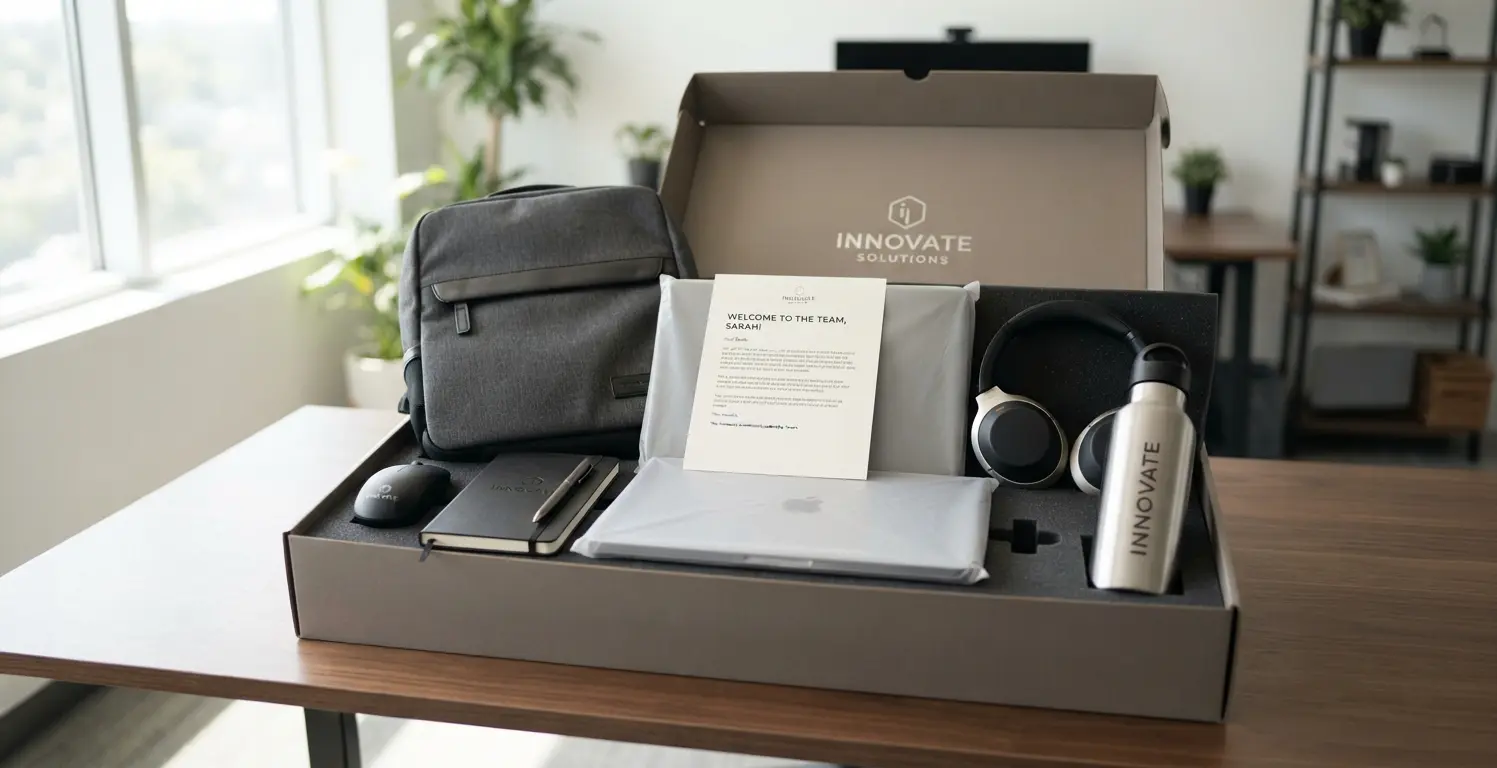
The most common mistake: separating culture from technology
Welcome kit: The set of items that a company delivers to a new employee to reinforce the culture and provide them with the tools for their role. It usually includes merchandising (backpacks, bottles, t-shirts), work accessories (mouse, headphones), and cultural elements (welcome letters, manuals of values). |
The most critical element within that kit is the laptop, configured and ready to use.
However, it is common for companies to invest in merchandising and treat the hardware as a separate process. Another team, another provider.
The result is predictable: the shipments do not match. The employee receives the backpack before the laptop, or vice versa. What should be a single welcome experience becomes two disconnected deliveries.
The solution is not more budget. It is to integrate everything into a single shipment. Let the first box contain both the company culture and the tool for the job.

Planned vs. improvised onboarding
Improvised onboarding | Planned onboarding | |
|---|---|---|
Time to productivity | Wasted days resolving access and tools | Productive from day one |
First impression | Chaotic, raises doubts about the company | Professional and organized |
Internal coordination | Nobody knows who does what | IT, HR, and OPS aligned |
Security risks | Incorrect access, information loss | Correct access from the start |
Talent retention | Chaotic experience drives turnover | Organized experience builds commitment |
For remote teams | Delays, lack of equipment, isolation | Everything needed from day one, remotely |
The extra complexity of doing it in LATAM
All of the above is already a challenge in a single country. Multiply it by Argentina, Mexico, Colombia, and Brazil. Each with its own customs, its timelines, and its suppliers. IT onboarding stops being an internal process and becomes an international logistics operation.
Many companies solve this with global providers that centralize operations from the United States or Europe and outsource what happens in LATAM to regional vendors.
"Global coverage" sounds good. But it does not always mean real control over what happens in each country. Delivery times, warranties, and traceability end up depending on a third party over which there is no direct visibility.
The alternative is to have own operations in the region. Someone who buys, delivers, and retrieves the equipment directly, without intermediaries between the company and the employee. That is the key to operating in LATAM without friction.
How First Plug Solves It
First Plug's approach stems from a simple decision: no outsourcing.
We have our own operations in every LATAM country where your employees work. We purchase, deliver, support, and retrieve the equipment directly. Without relying on regional vendors over whom we have no control.
This translates into concrete benefits:
A single point of contact for the entire hardware lifecycle. From purchase to offboarding, you talk to us, not to a chain of different suppliers in each country
Official Apple Reseller in LATAM. Direct purchase, with no middle steps or extra costs
You don't need a legal entity in each country to equip your team. We already have it
BuyBack: when a device reaches the end of its useful life, we buy it back from you, instead of leaving it as an unmanaged asset
Personalized support, with the agility of a startup and without the bureaucracy of a multinational
This in-house operation is what allows us to integrate hardware and a welcome kit into a single shipment. Coordinating deliveries in real time per country, not estimates from an office on another continent.
If your company has employees outside of LATAM, we have them covered too. We ship to over 170 countries. But our reason for being is solving the pain points of remote work in the region.
Conclusion
IT onboarding fails because it is treated as isolated tasks between departments that do not talk to each other, or because it falls on a single overwhelmed person. In LATAM, this fragmentation is worsened by the unique logic of each country: different customs, different providers, different deadlines.
The difference between onboarding that adds value and one that subtracts is not in how much is invested. It is in whether hardware, access, and culture arrive as a single coordinated experience, or as three processes that happen to coincide in the same week.
Planning it with time, integrating shipments, and working with someone who has real control in each country is not a luxury. It is what separates a productive employee from day one from one who spends their first week resolving access issues.
You might also be interested in…